Before we dive in, here’s a quick definition of cloud commitments. They’re how companies secure a discount on their cloud spend. Instead of paying the full hourly price, you commit to a level of usage with the provider for one or three years, and in return it cuts your price significantly. On AWS, the two main types are Savings Plans and Reserved Instances (RIs). They’re among the best ways to lower a cloud bill. As you’ll see, they’re also among the easiest large purchases a single employee can make.
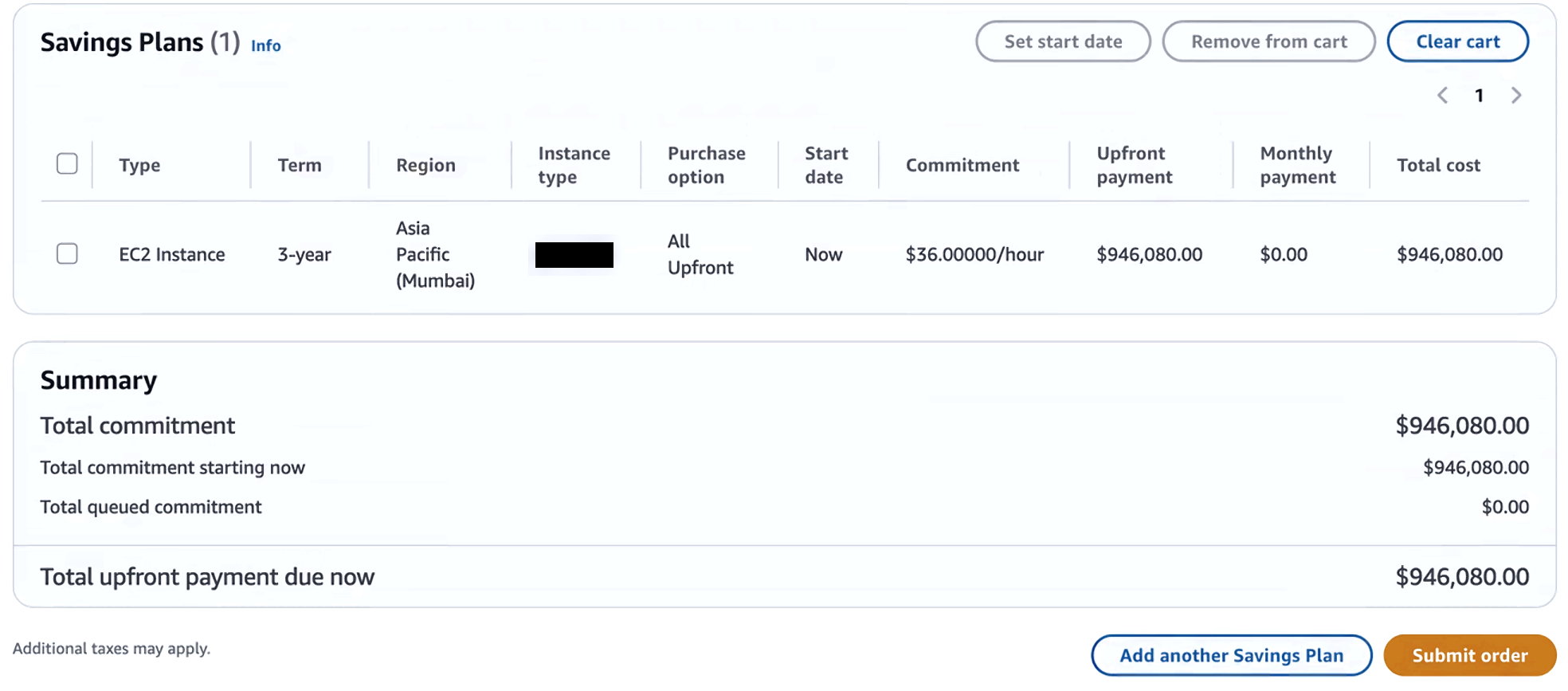
A few weeks ago I purchased a commitment worth $1M. OK, $946,080 to be exact. And it was for one server. One!
It was a high-end GPU instance, on a 3-year term, paid all upfront. The whole amount was due on the spot.
The whole thing took about two minutes. I filled in a form, clicked “Add to cart”, clicked “Submit order”, and AWS confirmed that the order was being processed. The screen did not ask for a purchase order, a second approver, or a finance sign-off.
Now ask yourself: what does it take to buy a $1M piece of hardware in your organization? Or a three-year software license at that price?
There would be a business case, a budget owner, competing quotes, a negotiation, and a CFO signature. So who approves the same amount when it is a cloud commitment?
Cloud commitments (Savings Plans and Reserved Instances) are a contract, not a setting
Every major cloud offers commitments, under different names. On AWS and Azure, they’re Savings Plans and Reserved Instances. On Google Cloud, they’re Committed Use Discounts (CUDs).
You don’t buy a server. You buy a promise: either a fixed amount of spend per hour (a Savings Plan), or a specific type of resource in a specific region (a Reserved Instance). The provider then applies the discount automatically to matching usage on your bill, every hour of the term. Discounts can reach up to 72% off on-demand prices.
For years, commitments looked like a technical setting that made the bill smaller. They are actually financial contracts:
- You pay whether you use it or not. An unused hour is billed anyway, and it can’t roll over.
- You generally can’t cancel. A Savings Plan or Reserved Instance can’t be cancelled, and only some Reserved Instances can be resold.
- It affects your cash. An all-upfront purchase moves three years of cost out of the bank on day one and creates a prepaid asset to amortize.
- It can outlive your assumptions. Three years is a long time. Will this workload, this model, and even this GPU generation still make sense in 2029?
You would check all of this before any other multi-year purchase. For cloud commitments, in most cases, nobody does.
Who is buying commitments today?
In most organizations, Savings Plans and Reserved Instances are purchased by a FinOps analyst, a DevOps engineer, or a third-party vendor. Procurement often doesn’t know these purchases exist. Finance are lucky to find out when the invoice arrives.
And even then, the commitments are hard to spot. A cloud invoice can run for pages, across dozens of services and hundreds of line items. A million-dollar Savings Plan shows up as a single line, or as a recurring monthly fee sitting among ordinary usage charges. Most finance and procurement teams I meet don’t know which commitments their organization holds, how much they cost, how to amortize them, or when they expire. You can’t govern a commitment you don’t know exists.
I want to be clear: FinOps and DevOps teams do great work here. They understand the usage better than anyone, and their recommendation should drive the decision. But recommending a commitment and committing the organization are two different things. A person who can’t sign a $1M contract shouldn’t be able to sign one through a console.
The fee you never see
When a third party buys commitments on your behalf, it may keep up to 40% of the discount you would get by buying them yourself.
Here’s the wording from a reseller agreement at a company I recently started working with:
“Our Savings Plan Coverage Program is designed to deliver maximum cost efficiency on your monthly AWS spend with 60% of the Savings Plan savings returned directly to your organization…”
Read it again. If 60% of the savings come back to you, 40% stay with the reseller.
The customer never gets an invoice for this. There’s no line item called “Savings Plans commission fee.” They see a discount on their bill and assume it’s the full discount. The fee is hidden inside a smaller discount, so nobody tracks it.
For this company, the missing share is more than $100,000 a month, over $1M a year. It never reached them, and until now nobody knew.
Let’s put numbers on it. Take a $200 per hour, 3-year Savings Plan at a 50% discount. It covers $400 an hour of On-Demand usage, so it saves you $200 an hour, or $146,000 a month (at 730 hours a month).
| Over the 3-year term | Monthly | Total (36 months) |
|---|---|---|
| Full savings from AWS | $146,000 | $5,256,000 |
| What reaches you (60%) | $87,600 | $3,153,600 |
| Kept by the third party (40%) | $58,400 | $2,102,400 |
That’s $2.1 million over three years, for a single Savings Plan, and it never shows up on an invoice.
The shift: finance and procurement take the lead
In the companies I work with, there’s a moment I’ve come to love. It’s when finance and procurement realize how much they’ve been paying a third party to manage their commitments, without ever knowing it. And right after that, the second question lands: “How come we’re not part of the decision on the company’s long-term commitments?”
That’s the aha moment, and it’s when the process changes. We see it at Riverside, Claroty, Orca Security and others. Finance, Procurement and Operations take ownership of commitments and bring their management in house. FinOps and engineering keep doing what they do best, and the people with the authority to commit the organization now lead the decision.
Here’s how the roles look once that shift happens:
| Team | Role in a commitment purchase |
|---|---|
| FinOps | Analyzes usage and recommends what, how much and when |
| Engineering / Data | Confirms the workload stays for the full term, and optimizes it before committing |
| Finance | Owns the decision: approves the purchase and payment option, amortizes it, and tracks the renewal calendar |
| Procurement | Compares options, negotiates, and manages the provider and any third party |
This process doesn’t need to slow anyone down. For small, routine purchases, a simple approval threshold and a monthly review are enough. A seven-figure purchase deserves the same process as any other seven-figure deal.
Questions worth asking
If you feel there’s something here worth digging into, start by asking these questions:
- Who manages our commitments today? A FinOps analyst, a DevOps engineer, or a third party?
- If it’s a third party, what share of the discount do they keep?
- How much would we save if we managed commitments ourselves? The gap between this answer and the last one is the third party’s margin.
- Do we have the knowledge in house to do it ourselves? Commitments come with many nuances, by cloud provider, service, instance generation and payment option.
- Can you show me every active commitment we hold, what it costs, when it expires, who approved it, and how much of it we actually use?
You’re professionals. You know how to spot a broken process, or a vendor taking advantage of your organization. If even one of these answers lights a red light, that’s your opportunity to make an impact, with a guaranteed ROI.
Your partner for managing commitments
For years, we’ve managed cloud commitments for many companies. To do it well, we built an internal tool: one place to see each company’s commitments, coverage and savings, and to plan every purchase and renewal. Now we’ve decided to offer it as the OskaQ commitment management platform, for companies that want to manage their cloud commitments in house.
Here’s how OskaQ closes each of the gaps we raised:
- Visibility. Every commitment-eligible service, how much of each is covered, what you save today, and the savings you’re still leaving on the table.
- Inventory and timeline. Every Savings Plan and Reserved Instance in one place: what it costs, when it expires, and how much of it you actually use.
- Knowledge. The AI-powered OskaQ agent answers your questions and flags the nuances that cost real money, like an OpenSearch RI that stops applying when an instance is resized, or a Database Savings Plan that doesn’t cover old generation instances.
- New purchases and renewals. The agent helps you model each new purchase and renewal, before anyone clicks “Submit order”. It also tells you which questions to ask internally first, so you avoid the pitfalls that show up after you commit. For example: is the data team planning to upgrade to a newer database generation, or to move ElastiCache from Redis OSS to Valkey? Either one changes which commitment makes sense.
- The full discount stays with you. Your organization buys the commitments directly, so no one takes a cut of your savings.
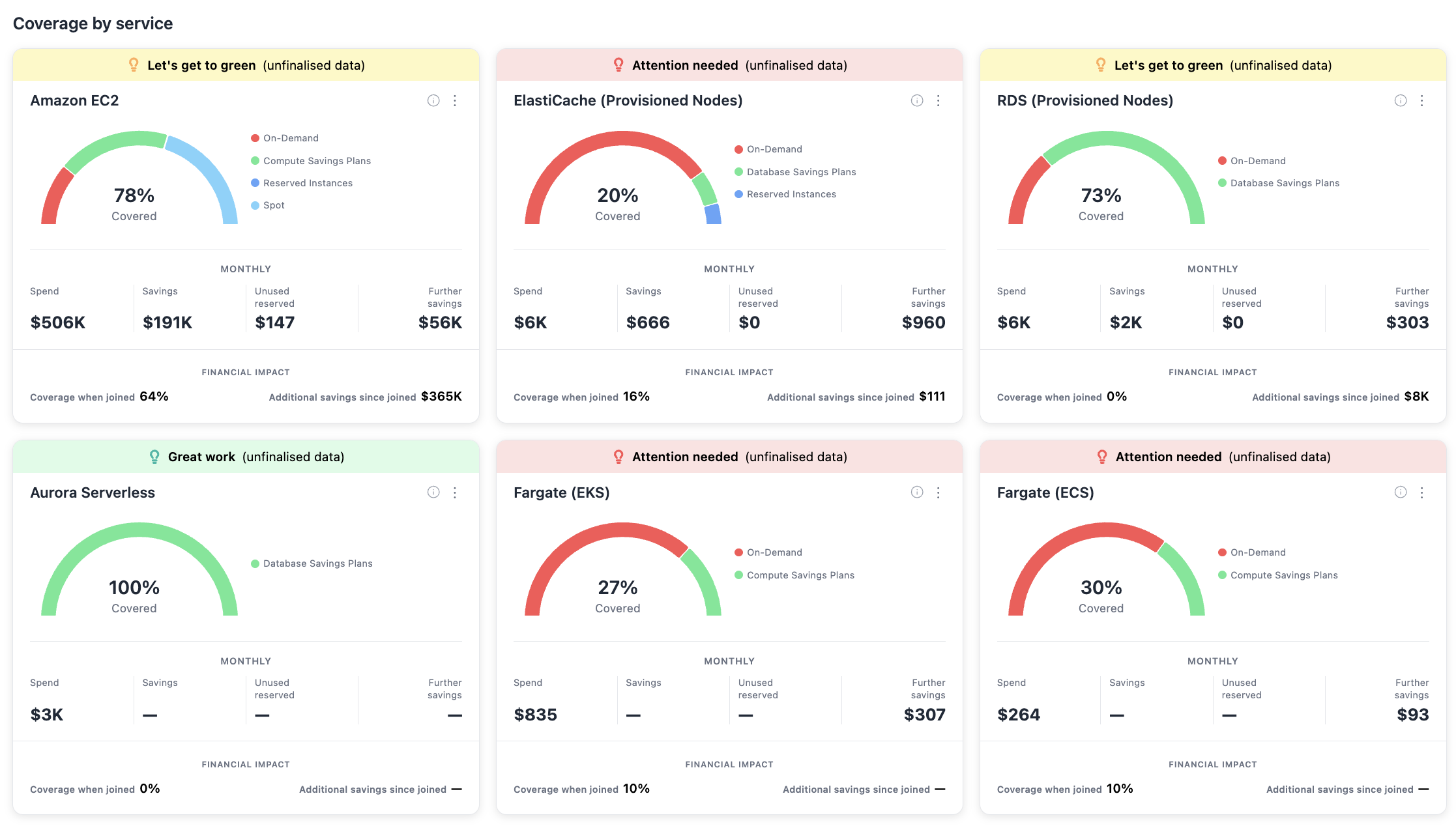
The result is the shift we talked about earlier. Your analysts keep doing the analysis, while finance and procurement get the visibility and control to own the decision and approve every commitment with confidence.
If you’d like to see it on your own data, or want a second pair of eyes on your commitments, we are here to talk.
Stay tuned for our next episode.